
Assisted documentation from patient instructions
You can now write the treatment only in your patient’s Indicaciones (patient instructions) without repeating it in the note. Assisted documentation, the clinical chat, and AI-drafted documents now read the instructions alongside the note to propose prescriptions and draft with the full context of the visit.
Proposals in Plan and AI-drafted documents
Write the treatment in Tratamiento → Indicaciones (Treatment → Patient instructions) the way your patient will read it, then open Documentación asistida (Assisted documentation) from the visit’s right-hand bar. The medications you wrote appear as proposals in the Plan step with their VIDAL product and dosing. If you also mentioned them in the note, Astrocyte merges them into a single proposal so they are not duplicated.
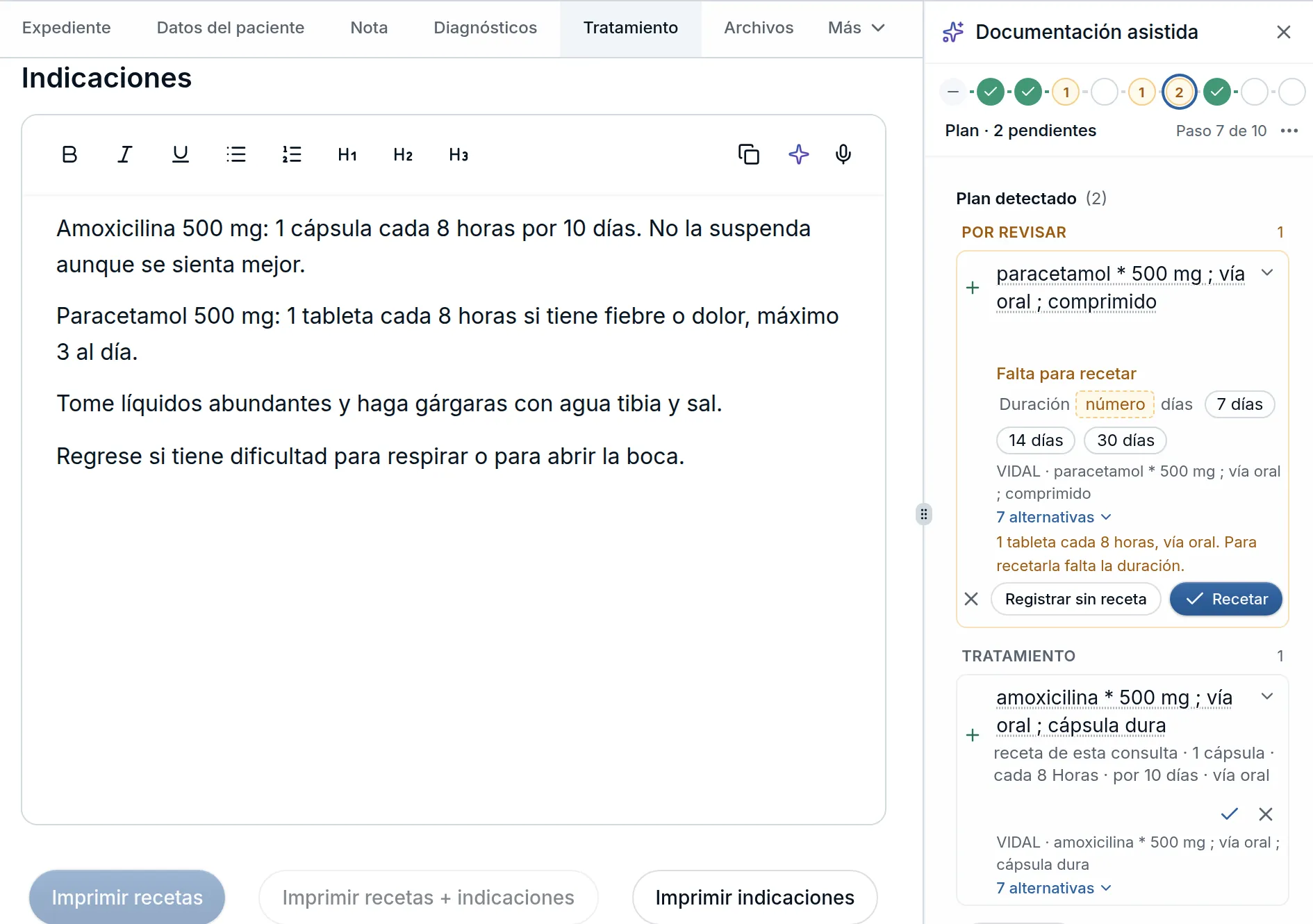
Nothing enters the health record without your confirmation. When a medication is missing a detail required for a prescription, such as the duration of a painkiller given only as needed, the card lets you fill it in right there or record it without a prescription.
If you edit the instructions after extracting the visit, the panel shows La consulta cambió después de extraer (The visit changed after extracting). Click Actualizar propuestas (Update proposals) so assisted documentation reads both the note and the instructions again. Visits extracted before this update may display this notice once when you reopen them.
Your instructions also feed the clinical chat, AI-drafted documents, and form prefilling. When you generate a medical excuse, clinical report, clinical summary, legal or custom document, a consultation request from Referencias (Referrals), or a referral, consultation, or discharge note, Astrocyte saves the visit first so what you just wrote is included. The same applies when prefilling consent form fields or your organization’s forms. Your medical note and the visit’s other internal clinical notes do not copy the instructions.
Improvements and fixes
- Diagnoses on documents · Prescriptions, test requests, referrals, notes, and printed patient instructions follow your visit’s order and always place the primary diagnosis first.
- Diagnosis search · Searching clinical acronyms such as IAM, HAS, ERGE, ICC, or ITU, or everyday Spanish terms such as sarna (scabies), juanete (bunion), or almorranas (hemorrhoids), brings the right ICD-10 code to the top of the results.
- Lab results · When reading a lab report, Astrocyte interprets each result’s flag using the report’s own legend. Symbols with a different meaning, such as an accredited-test mark, are ignored, and a generic marker like an asterisk takes its direction from the printed reference range on that row: an HDL cholesterol of 35 with a range above 40 is marked Bajo (Low).
- Google Calendar · When you switch to a different Google account, new appointments sync to the connected account’s calendar without triggering Se borró en Google (Deleted in Google) notices for events from the previous account. Appointments already in the previous account stay there.
- AI notes · Note enhancement with ✧ and chat note drafts produce more complete clinical notes faithful to your visit, without inserting ICD-10 codes in the prose so structured coding stays cleanly in Diagnósticos (Diagnoses).
