
Let the patient know they can join
In online visits you now decide when to tell the patient they can join. Assisted documentation also records instantly and lets you print or send in a single click, and the Solicitudes activas (Active orders) card reads in full, grouped by destination.
Let the patient know they can join
The notice to join an online visit reaches the patient 3 minutes before the appointment, always. It no longer goes out early when you tap Atender (See patient): you can open the note, read the record and get ready without the patient getting the link ahead of time.
If you’re ready earlier, when you open the note for that appointment a strip tells you when the appointment is and when the patient will get the link. With Avisarle que ya puede entrar (Let them know they can join), the notice goes out right then, with no confirmation, and the strip tells you how we reached the patient. The same action is in the appointment menu in the schedule, as Avisar que ya puede entrar (Let them know they can join).
That notice takes the place of the 3-minute one, so the patient doesn’t get two. If it goes out before the appointment time, the patient reads «Ya puedes entrar a tu consulta» (You can now join your visit). It’s offered on the day of the appointment, until the automatic notice is due.
Record without waiting
In assisted documentation, Aceptar (Accept) and the button on each step no longer make you wait: the card is recorded instantly and the assistant moves on to the next step while Astrocyte saves to the record.
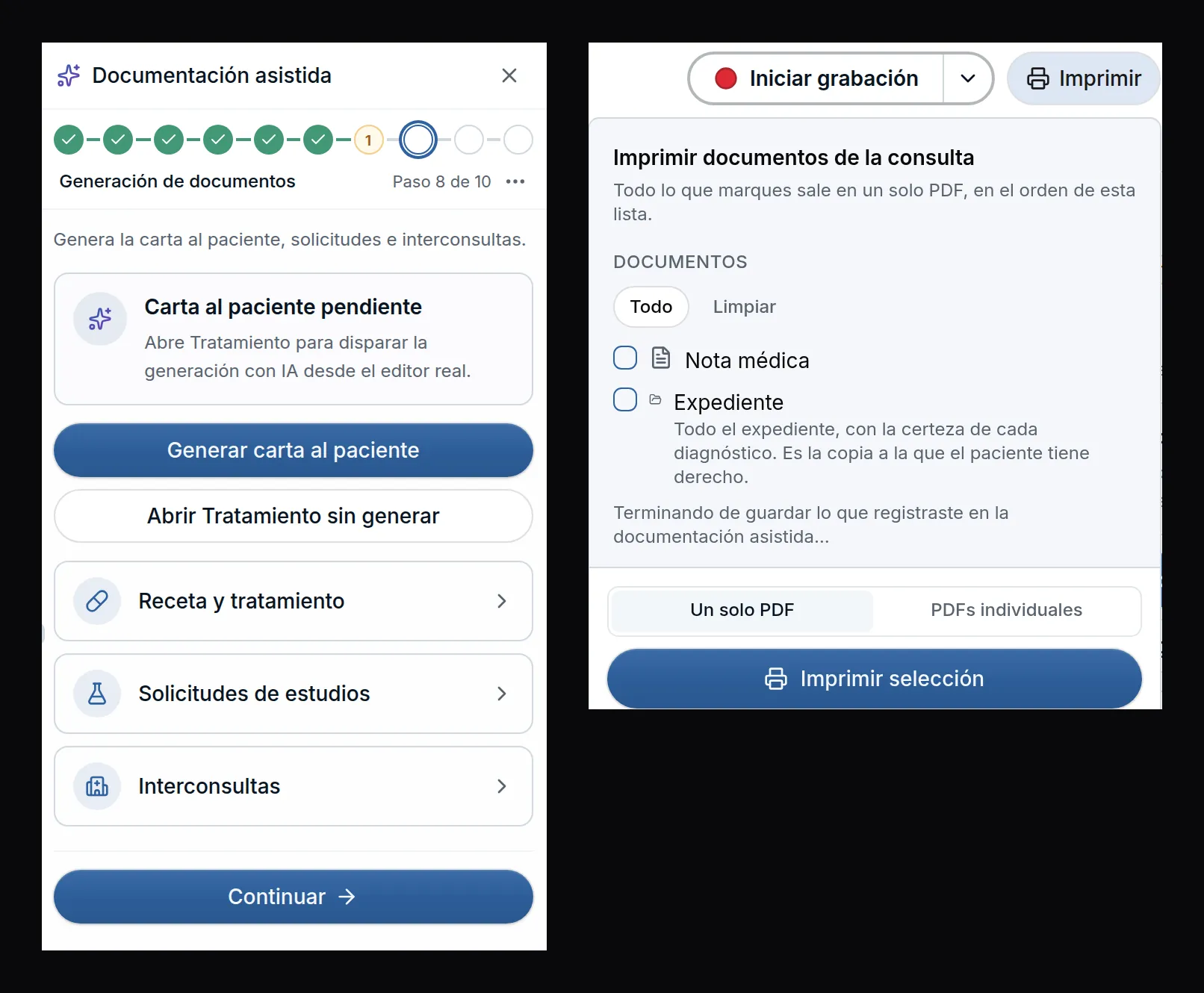
If you tap Imprimir (Print) or Enviar (Send) while what you just recorded is being saved, you don’t have to tap it again. The panel tells you it’s finishing saving, the viewer opens on the same click and the document comes out with what you just recorded. New items come in checked, and whatever you unchecked stays out.
If something couldn’t be saved, its step flags it, the card comes back with the reason and, before printing or sending, Astrocyte asks what to do with it.
Active orders
In the Solicitudes (Orders) tab, the Solicitudes activas (Active orders) card is a list by destination. Each study takes one line with its checkbox, its full name and its instructions, and the ⋯ on each one spells out its actions: Agregar indicación (Add instructions), Marcar realizada (Mark as done), Subir (Move up), Bajar (Move down) and Mover a (Move to).
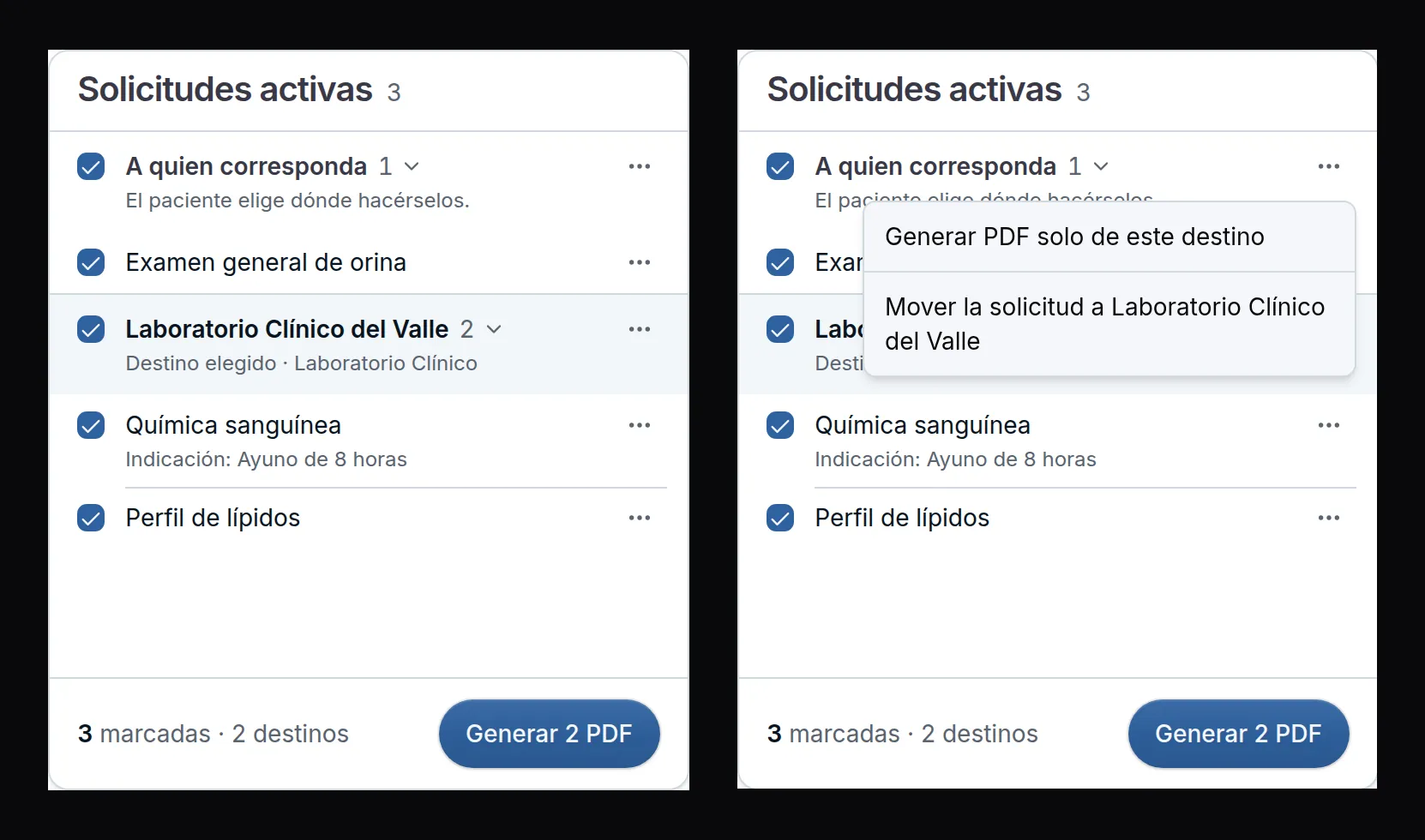
The ⋯ on each destination generates the PDF for that destination only and moves all its studies to the destination you chose. When you move several studies to the same lab, they end up in a single order and a single sheet prints. At the bottom, the footer tells you how many studies you checked and how many PDFs will come out; studies already done don’t print.
On a tablet there’s no need to drag: Subir, Bajar and Mover a are in each study’s ⋯.
Improvements and fixes
- Several organizations · You connect Zoom once and it works in all your organizations; if you disconnect it in one, it’s removed from all of them, and the dialog tells you so. Your Solo yo (Only me) pre-visit forms also follow you across all your organizations, and each patient’s answers stay in the organization of their appointment.
- Dictation · The audio of every recording stays saved with its note even if your internet drops or you close the tab, and starting another recording no longer erases the previous one.
- Sending · If you correct something and send the same documents to the same destination again, a new send goes out with the data as it is at that moment. If that send had already gone out, the panel says Ya se había enviado (Already sent).
- Prescription · A prescription without instructions no longer prints a sheet with only the signature: the signature moves to the next sheet together with the end of the prescription.
- Templates · If what you entered today is already complete in a template, the panel tells you with Lo de hoy ya está en (Today’s items are already in), instead of offering to save it again.
- Note · Recorded diagnoses line up, and the date of the first diagnosis shows as Desde (Since) under the code. There are also security improvements.
