
Visit minutes in the schedule
The schedule now tells you and your team who is in a visit and for how many minutes, and how long each finished visit took. Every chat card also shows at the top which patient it writes to, and in the record’s activity you can see the message each chat-recorded item came from.
In a visit and Seen, with their minutes
In Consulta (Visits), each patient’s status reads En consulta · 12 min (In a visit · 12 min) while their note is open, and Atendido · 28 min (Seen · 28 min) when it’s done. You see it in the daily sheet, in Lista (List), in Semana (Week) and in each appointment’s window. Your assistant and the administration see the same thing, without having to ask you.
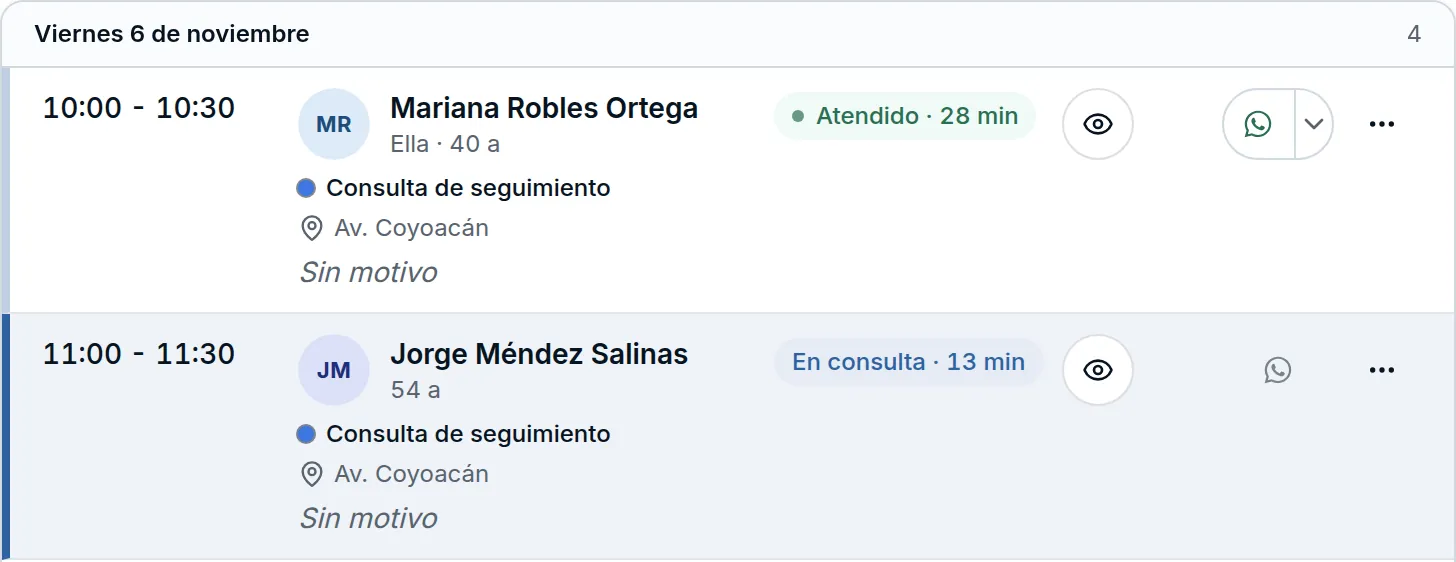
The minutes come from the visit clock: the time the physician spent working in that patient’s note. After 15 minutes with no activity or recording in the note, the clock stops. Tapping the label opens the same status menu as always.
Events from your Google Calendar are seen just like an Astrocyte appointment: Atender (See patient) asks for the patient and the office, marks the appointment as Atendida (Seen) and opens its note. There’s no longer a Finalizar atención (End visit) step at the end. An event on a future day is seen or imported on the day of its appointment.
The patient at the top of every card
Every chat card that writes to a record opens with its patient: the name, the date of birth with the age, and the part of the record where it will land, such as Ficha › Ocupación (Profile › Occupation) or the visit with its date and physician. Abrir (Open) takes you to that place in the record.
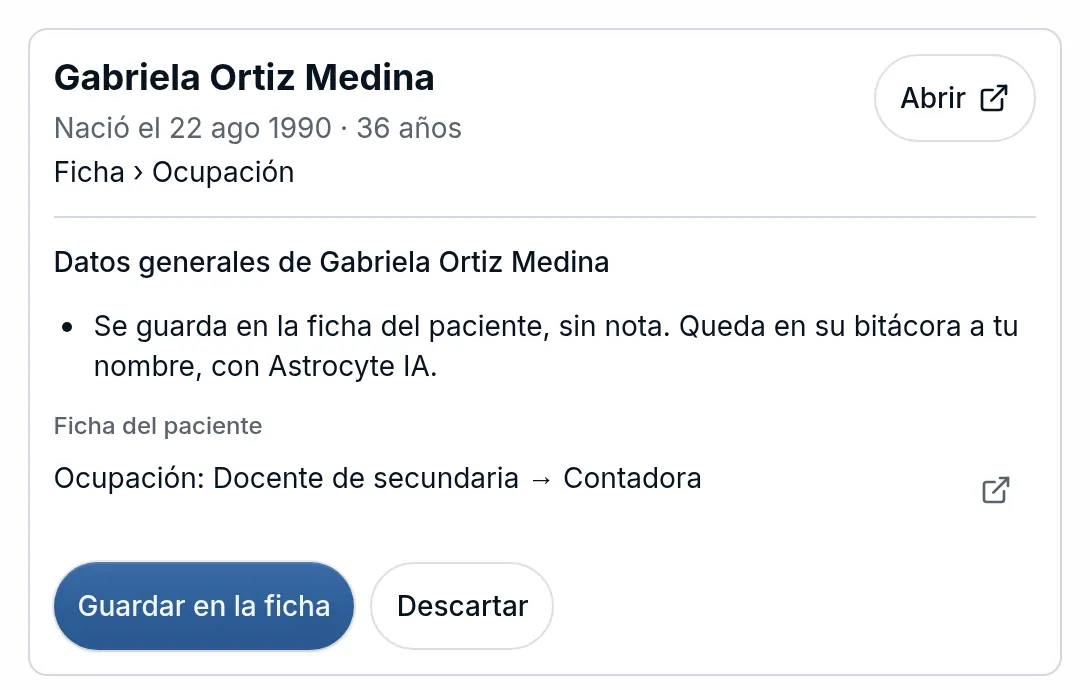
If the card isn’t for the patient or the note you have open, it tells you before saving: No es el paciente que tienes abierto (This isn’t the patient you have open). When a message mentions two patients, each one gets its own card and is approved separately.
Which message each item came from
What you record through the chat shows up in the record’s Actividad reciente (Recent activity) with Desde el chat · Ver el mensaje (From the chat · See the message). Opening it shows what you wrote, who wrote it and when, and what the chat understood for that patient.
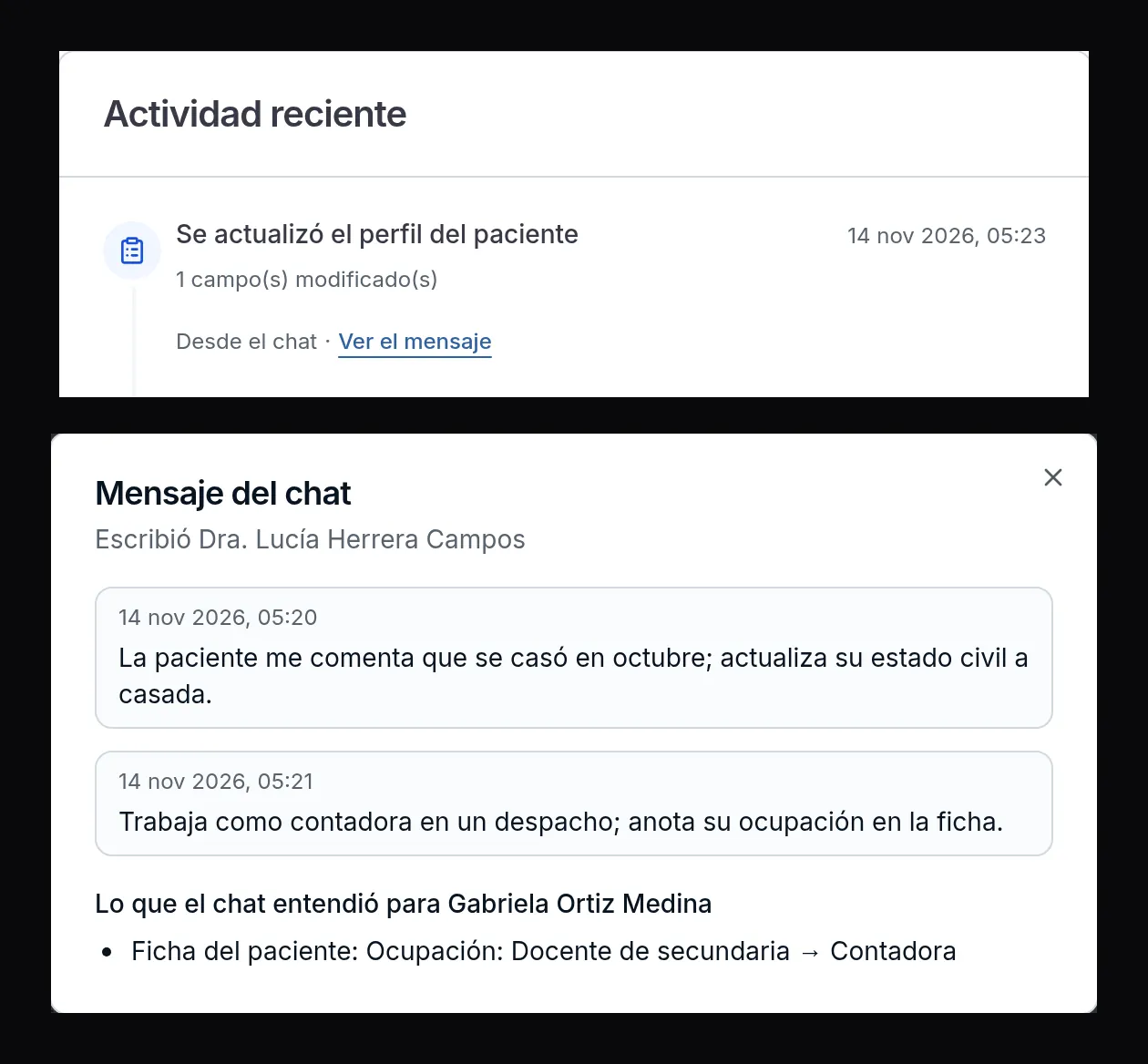
Only professionals can read the message; your assistant sees Desde el chat (From the chat) without the link. Every time someone opens it, it’s logged in the patient’s audit trail.
Improvements and fixes
- Online visits · The patient’s link opens the Tu consulta en línea está lista (Your online visit is ready) screen with the Entrar a la videollamada (Join the video call) button. With that tap, the phone opens the Google Meet app if it’s installed. Below, the room code appears so they can join from the app if the phone doesn’t open it.
- Printing · If you tap Imprimir (Print) right after recording something, the document waits for what you recorded. If the record doesn’t finish updating, it doesn’t print an incomplete version: it asks you to try again in a moment, just like Enviar (Send).
- Chat · If the chat can’t answer or you stop it, it says so in the conversation, also when you open it again. A stopped search reads Búsqueda sin terminar (Search not finished). If a card changed while you were reviewing it, the chat asks you to review it again before retrying.
- Appointments · Seeing or canceling an appointment works on the first try, also during the minutes when Astrocyte is preparing the patient’s notices.
